Latent

Find the photographs you already took.

Latent is a macOS app for photographers with a large archive of RAW and JPEG files. It builds a fast local index, so you can browse the whole archive, search it by meaning, and arrange what you find into Sequences. Your originals stay where they are.

Install Latent Read the source

Developer preview · Apple Silicon · macOS 26

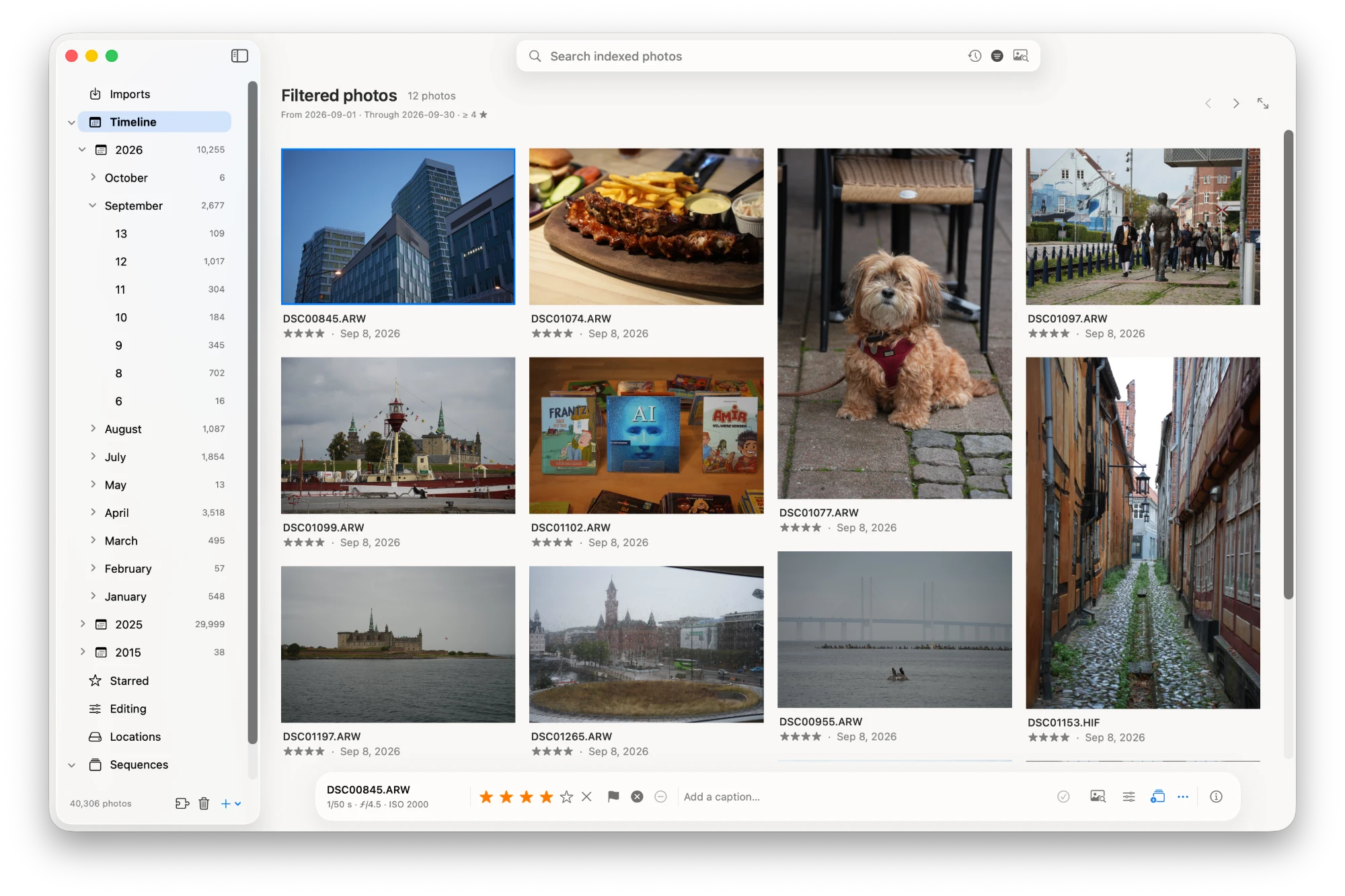
The Latent library window: a timeline sidebar beside a grid of photos filtered by date and rating
The library window: a year, month, and day timeline beside a gallery filtered by date and rating, in an archive of 40,306 photos.

The whole archive, from previews

Timeline

Latent reads each photo once and keeps a local index of previews and metadata. After that, a photo-first gallery and a year, month, and day timeline move through the archive at the speed of local files. It has been tested with more than 40,000 photos.

Originals stay on a local disk, an external drive, or a mounted cloud drive. Browsing never downloads, moves, renames, or rewrites them.

Search by meaning

AI Search

Describe a photo in any language, or start from a reference image. Sort the results by most similar, least similar, or more variety, and open similar photos from any picture.

Gemini Embedding 2
Runs through the Gemini API. Latent uploads small contact previews when it builds the index, and sends each search.
EmbeddingGemma 2
Runs on your Mac through llama.cpp. Nothing leaves the Mac, and a search costs nothing.

Each engine keeps its own index, and you switch between them explicitly.

Review from the keyboard

Contact sheet

Rate, flag, and caption photos, star the ones you come back to, and filter by date, rating, Starred, and flag.

Space
Preview
0–5
Rating
Q R
Pick and reject
W E
Previous and next photo

Sequences

Curation

Arrange selections in order, in nested folders, with drag and drop. Export a Sequence as a folder of symbolic links to the originals, so another app can open it without copies.

From the card to the edit

Imports

Add camera cards or folders, and Latent builds previews for ARW, JPEG, HEIF, PNG, and TIFF. It can copy originals into an archive folder and verify every checksum.

Prepare a batch for DxO PhotoLab, and Latent saves the finished photos next to their originals. Interval shooting is found from EXIF data and collapsed into one entry in the timeline.

A curator that keeps to the evidence

Curator

The curator explains why photos are related and finds visual motifs that recur across years. It reports what the stored vectors and EXIF data show. It does not guess who is in a photo, where it was taken, or what story it tells.

What leaves your Mac

Latent has no accounts and no telemetry. The catalog, the previews, the vectors, and your ratings, captions, and Sequences stay on your Mac. What leaves it depends on the search engine.

EngineSent off the Mac
Gemini Embedding 2512-pixel contact previews when you build the index, plus search text and reference images
EmbeddingGemma 2Nothing
  • Building an index always starts with a review of the photo count, and for Gemini, the upload size and the estimated cost. Imports never start it.
  • The Gemini API key stays in your login Keychain. Latent never writes it to its own files, databases, or logs.

Three layers, kept apart

  1. The archive

    Read only

    Your originals and sidecars. Browsing and search only read them. Photos you delete go to a Latent Trash folder beside them, and you can restore them from there.

  2. The index

    Rebuildable

    Metadata, contact and preview images, and search vectors, in a local SQLite catalog and cache. Delete it, and Latent rebuilds it from the archive.

  3. The workspace

    Yours

    Ratings, captions, flags, Sequences, imports, and search history, kept apart from the index. Export it as a backup; importing it merges and never overwrites.

A Python service owns all three layers. The native app, built with SwiftUI and AppKit, talks to it over loopback HTTP. The same service also serves a browser gallery at 127.0.0.1:8766.

Install

Latent is a developer preview. It runs from a source checkout, and there is no packaged download yet. You need:

  • An Apple Silicon Mac with macOS 26 or later
  • Xcode or the Command Line Tools, with Swift 6.2 or later
  • Python 3.11 or later and uv
  • ExifTool, from brew install exiftool
git clone https://github.com/Audiofool934/latent.git
cd latent
uv sync
scripts/build-macos.sh
open var/native/Latent.app

Then, in the app:

  1. Open Imports, choose Add folders…, and then Build previews.
  2. Use Locations to connect archive folders or a mounted cloud drive.
  3. Open AI Search, choose a search engine, and build its index.

The README covers the Gemini API key, on-device search, and the command line.